WhatsApp Automation for Small Business: What to Automate
Reminders, follow-ups, payment nudges, birthdays, opt-in broadcasts: what to automate on WhatsApp from your own number, how, and what to keep sending by hand.
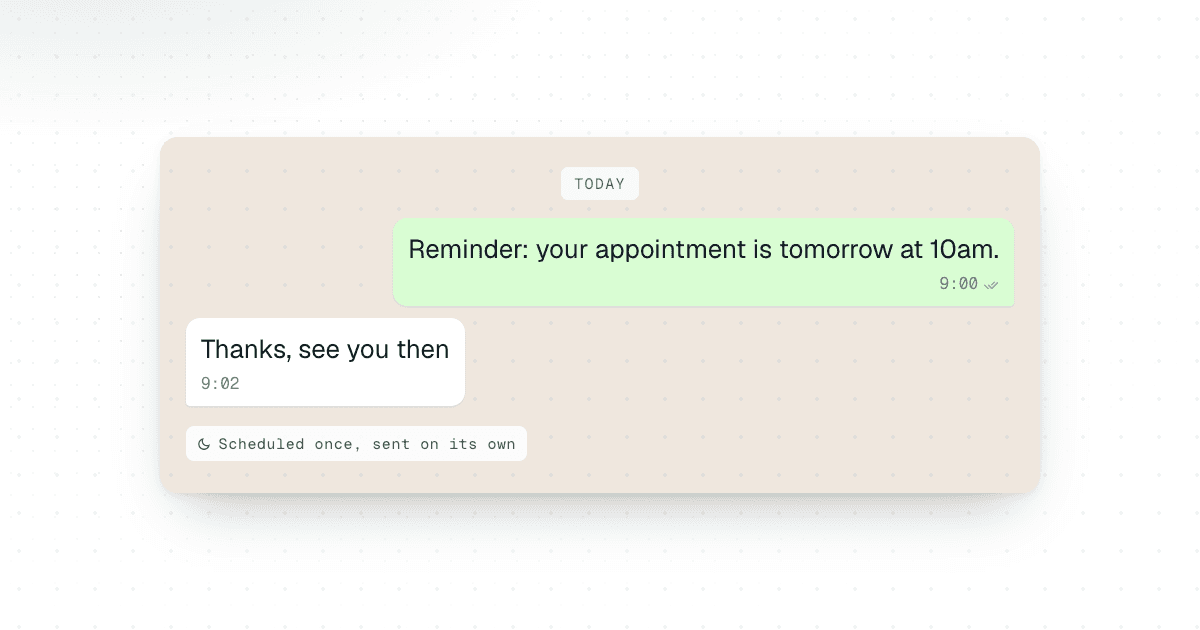
If a WhatsApp message has a predictable purpose and a predictable time, you can automate it. For a small business, coach, consultant or freelancer, that usually means appointment and service reminders, follow-ups after a call or quote, weekly or monthly updates, payment reminders, birthday messages, and broadcasts to people who asked to hear from you. Most of these only need scheduling from your own number: Chatmaid Schedule does that from your phone, and Chatmaid Web does it for whole contact lists. Messages that should go out when something happens in your own software, such as an order shipping or a booking coming in, need an API like Chatmaid Developers.
What should stay manual is just as clear: anything that depends on what the other person just said.
Which WhatsApp messages are worth automating?
Start with your own sent messages, not a feature list. Scroll through last week's chats and mark every message you sent more than once for the same reason. A message is a good candidate when three things are true:
- The purpose is fixed. A reminder is a reminder. Only the name, date or amount changes.
- The timing is known in advance. It should arrive the day before the appointment, on the first of the month, or two days after the proposal.
- It does not depend on a reply. If you need to read their last message before writing yours, keep it manual.
For most small businesses and solo professionals, the list ends up looking like this:
- Appointment, service and maintenance reminders
- Follow-ups after a call, a quote or a proposal
- Recurring updates to a client, a team or a group
- Payment and renewal reminders
- Birthdays and other dates you would otherwise forget
- Broadcasts to customers who opted in
- Messages triggered by your own systems, such as booking confirmations or shipping notices
Do not try to set up all seven in one afternoon. Pick one, get it right, and add the next once the first runs without you thinking about it. A sensible order for most businesses is reminders first, because the timing is obvious, then follow-ups, because they are the ones that slip, then recurring updates.
Appointment, service and maintenance reminders
A reminder is the cleanest thing to automate, because you know the date the moment the booking is made. Schedule the reminder right then instead of making a note to send it later.
A common pattern is two messages: one the day before with the details, and a short one an hour or two before. For services that come around on a cycle, like a car service, a boiler check, a cleaning visit or a dental check-up, schedule the next reminder as soon as the current visit is done. The customer gets a nudge months later, and you do not have to keep a calendar of who is due when.
Hi Maria, this is a reminder of your appointment tomorrow, Thursday, at 10:30 at our Main Street location. Reply here if you need to change the time.
Hi Tom, it has been six months since we serviced your air conditioning. Want us to book the next visit? Reply with a day that suits you.
Keep reminders short: who, when, where, and what to do if plans change. For ready-made wording, see our 50 WhatsApp reminder message templates.
With Chatmaid Schedule, the message goes out from your own number at the time you set. It is sent from Chatmaid's cloud, so it still arrives if your phone is off, out of battery or offline that day. If bookings come in through your own system and you want a reminder created for each one automatically, that is a job for an API. See how to build a WhatsApp appointment reminder system.
Follow-ups after a call, quote or proposal
Follow-ups slip for a simple reason: they come due on a day when you are busy with something else. The fix is to schedule them while you still have the context, right after the call, not on the day they are due.
Here is a short sequence after a discovery call or a quote, written once and scheduled straight away:
- Same day: a recap and the next step. "Hi James, thanks for the call today. The proposal we discussed is in your inbox. Happy to answer anything."
- Two days later: a light check-in. "Did you get a chance to look at the proposal? I can walk you through it on a 10-minute call if that helps."
- About a week later: one more useful touch, such as an answer to a question that came up on the call or a short example of similar work.
- Two to three weeks later: a last, no-pressure message that leaves the door open.
Two rules keep this from feeling robotic. First, write each message the way you would actually type it to that person. Second, stop the sequence the moment they reply. In Chatmaid Schedule, queued messages sit in Message History under scheduled, where you can open one to edit it or cancel it before it goes out. For more ideas, see these WhatsApp follow-up message templates.
Recurring updates: daily, weekly or monthly
Some messages are the same every week: a Monday plan for your team, a Friday note about the weekend's class times, a monthly check-in with a retainer client. Chatmaid Schedule repeats a message daily, weekly or monthly, to a contact or to a WhatsApp group, so you write it once instead of every time.
Good candidates:
- A Monday morning message to your team group with the week's priorities
- A weekly reminder to a class or community group about the next session
- A monthly "anything you need from me this month?" note to retainer clients
- A weekly note to a customer group with your opening hours and how to order
Recurring messages are easy to forget once they are running. Look through your scheduled messages every month or so, and update the wording when something changes, like a new address or a new class time. The full setup is in how to schedule recurring WhatsApp messages.
Payment and renewal reminders
Chasing payments is awkward, which is exactly why it gets put off. A scheduled reminder takes the awkwardness out of the moment: you wrote it days earlier in a calm tone, and it arrives when it should.
There are two kinds:
- Fixed dates. Rent, a monthly retainer, a membership or tuition that is due on the same day each month. A monthly recurring message a few days before the due date covers it. Because a recurring reminder goes out whether or not someone has paid, end it with a line such as "If you have already paid, thank you, and please ignore this."
- One-off invoices. Schedule a one-time reminder for the due date and, if you want, a second one a few days after. If the client pays early, cancel the remaining reminder so nobody gets chased for money they already paid.
Hi Daniel, a friendly reminder that invoice 1042 for $350 is due this Friday. You can pay by bank transfer to the usual account. If you have already paid, thank you, and please ignore this.
Include the amount, the due date and how to pay, so the client can act without writing back to ask. Keep the tone neutral. A reminder that reads like a threat costs more goodwill than a late payment is worth. For more wording, see the payment reminders in our 50 WhatsApp reminder message templates and how to follow up on an unpaid invoice.
Birthdays and other dates
Birthdays, client anniversaries and program milestones are easy to miss and nice to get right. Schedule each one as a one-time message. For clients and customers, pick a business hour such as mid-morning; a 12 a.m. wish suits friends and family better.
Chatmaid Schedule's recurring options are daily, weekly and monthly. There is no once-a-year option, so set each birthday up as a one-time message. Messages can be scheduled months ahead, so a simple habit is to schedule the coming year's birthdays in one sitting each January, or a month at a time if your list is long. Personal wording matters more here than anywhere else: use the person's name and one detail only you would know, and leave sales pitches out. Templates and the full setup are in how to schedule personalized WhatsApp birthday messages.
Broadcasts to customers who opted in
Sometimes you have one message for many people, a broadcast: a new menu, a holiday schedule, a class moving to a new time, a product back in stock. This is where Chatmaid Web fits. You upload a contact list from a CSV or Excel file, or add contacts by hand, write one message with personalized fields such as the person's name, and send it now, schedule it for later, or set it up as a campaign that sends in batches at the times you choose. The messages are spaced out instead of fired off all at once. You can edit or delete a scheduled message before it is sent, and pause or cancel a campaign.
The rule that matters most is to message only people who expect to hear from you: customers who gave you their number, members of your class, clients who asked for updates. WhatsApp restrictions are very unlikely with normal use. They happen when an account behaves like spam, which means sending unsolicited bulk messages to people who do not have you saved. A few habits help:
- Send only to people who opted in, and say who you are in the first line.
- Give an easy way out ("Reply STOP and I will take you off this list"), and honor it by removing them from your list.
- Send less often than you think you should. One useful message beats three forgettable ones.
When an API makes more sense
Scheduling covers messages you can plan. An API covers messages that should go out because something happened somewhere else:
- A booking is made on your website, and the customer gets a confirmation.
- An order ships, and the customer gets the tracking details.
- A payment goes through, and the client gets a short thank-you.
- A form is submitted, and the lead gets a first reply while you are on another call.
Chatmaid Developers is a WhatsApp API on your own number without Meta Business verification. Your application sends a message with one API request, and webhooks tell it about incoming messages, so it can react when a customer replies. Testing happens in a free sandbox, and production is $7.99/month flat as of October 2026. You need a developer, or a no-code tool that can make API calls: see how to send WhatsApp messages from Google Sheets or connect Make to WhatsApp. To compare it with Meta's API, read WhatsApp API without Meta Business verification.
What this looks like for coaches, consultants and freelancers
Coaches, consultants and freelancers have no one to hand messaging to, and the small messages that keep clients warm are the first to slip when you are busy delivering. Use the follow-up sequence and the two-step reminders above, then add:
- The morning after a session: an accountability check-in. "Good morning Lena, how is the pricing exercise going? Send me what you have by Thursday and I will take a look."
- Weekly during a project: a short status update every Friday, so the client never has to ask where things stand.
- At the end of a program: a message on the day they finish, recognizing the goal they set at the start.
- Monthly with past clients: a short personal check-in, written for that person, not copied to everyone.
Freelancers can add the invoice reminders from the payment section, plus a message a couple of weeks after delivery to ask how the work is holding up.
What should stay personal, and what should stay manual?
Automation gets a bad name when it produces messages written for nobody in particular. That is a writing problem, not a scheduling problem. The person reading your message cannot tell when you typed it. They can tell whether it was written for them.
- Fill in the details that make it theirs. A name, the appointment time, the invoice number, the thing you talked about on the call. In Chatmaid Web, a name field fills in each recipient's name from your contact list.
- Send at a human hour. A reminder at 3 a.m. gives away that a machine sent it. For timing ideas, see the best time to send WhatsApp messages for business.
- Answer replies yourself. Messages sent with Chatmaid come from your own number, so replies land in your normal WhatsApp chats. Treat them like any other conversation.
Automation is for the predictable part of your messaging. Keep these manual:
- Replies to questions and complaints
- Bad news, price negotiations and anything sensitive
- The first message to someone you just met, where your tone depends on how the conversation went
- Anything that would do real damage if it arrived with the wrong name or at the wrong time, unless you have checked it twice
The point of automating reminders and follow-ups is that your attention is free for these conversations. For follow-up wording and tone, see WhatsApp follow-up messages.
Which Chatmaid app fits which job?
| Job | Use |
|---|---|
| Reminders, follow-ups, payment reminders, birthdays, a weekly group message | Chatmaid Schedule (phone app) |
| One broadcast to a customer list, with each person's name | Chatmaid Web |
| Confirmations and notices triggered by your website, store or booking system | Chatmaid Developers (API) |
| An instant reply when someone writes to you | WhatsApp Business app greeting and away messages |
| One message up to two weeks ahead, if you have the beta | WhatsApp's own scheduled messages |
For how each method works, with prices, see ways to send WhatsApp messages.
WhatsApp is also testing its own scheduled messages. As of October 2026, the feature is rolling out only to some beta testers: on WhatsApp beta for Android since 12 October and, since 22 October, to some iPhone testers on TestFlight, according to WABetaInfo (Android, iPhone). It is not in the regular app on either platform, and there is no public release date. It handles one message at a time, up to two weeks ahead, with no recurring option and no way to send to many people at once. The greeting and away messages in the WhatsApp Business app are auto-replies: they only go out when someone writes to you, and they cannot send a message on their own at a time you pick. See can you schedule messages on WhatsApp Business? for what the Business app can and cannot automate, and is WhatsApp's scheduler available yet? for the full picture.
How to set up your first automated message
Here is the whole process with Chatmaid Schedule:
- Install the app on iPhone or Android, or create an account in the browser, and start the 7-day free trial. No credit card is needed.
- Link your WhatsApp. Chatmaid connects as a linked device, the same way WhatsApp Web does, so messages go out from your own number. It is not the WhatsApp Business API.
- Choose recipients: phone contacts, a WhatsApp group, or a number you have not saved, from the Unsaved tab.
- Write the message. You can use bold, italic and strikethrough, and attach photos, videos, documents or a voice note recorded in the app.
- Pick the date and time, then choose one-time or recurring (daily, weekly or monthly).
- Check Message History. It lists scheduled, completed and failed messages, and you can open a scheduled one to edit it.
Plans and current prices for all three apps are on the pricing page.
Frequently asked questions
Do I need the WhatsApp Business API to automate messages?
No. Chatmaid Schedule and Chatmaid Web link to your existing WhatsApp number as a linked device, the way WhatsApp Web does. If you need an API, Chatmaid Developers works on your own number without Meta Business verification.
Will automating messages get my WhatsApp number banned?
It is very unlikely with normal use. Restrictions happen when an account behaves like spam, such as sending unsolicited bulk messages to people who do not have you saved. Only message people who expect to hear from you.
Do scheduled messages still send if my phone is off?
Yes. Chatmaid sends scheduled messages from its cloud at the time you set, even if your phone is off, out of battery or offline.
Can WhatsApp schedule messages by itself?
As of October 2026, only for some beta testers: on WhatsApp beta for Android and, since 22 October, some iPhone testers on TestFlight. It is not in the regular app. It schedules one message up to two weeks ahead, with no recurring option and no way to send to many people at once.
How much does WhatsApp automation with Chatmaid cost?
As of October 2026, Chatmaid Schedule has a 7-day free trial with every feature and no credit card, then costs $2.79/month. Chatmaid Web is $12.99/month after a 7-day trial with 30 messages a day. Chatmaid Developers is $7.99/month with a free sandbox.
Can the WhatsApp Business app send automated messages?
Mostly replies. Greeting and away messages answer when someone writes to you. In some countries, the Business app also has business broadcasts, which can be scheduled for a date and time but are paid per delivered message, reviewed by Meta, and have no repeat option (WhatsApp Help Center). More in can you schedule messages on WhatsApp Business?