How to Build a WhatsApp Appointment Reminder System
A WhatsApp appointment reminder system is one of the highest-ROI automations a service business can build. The confirmation flow alone — where clients actively reply CONFIRM, RESCHEDULE, or CANCEL — transforms passive reminders into an active communication channel that surfaces problems in time to fix them. Get started free: developers.chatmaid.net/signup
No-shows cost businesses money. A missed appointment slot that can't be refilled is pure lost revenue — and in service businesses like clinics, salons, legal offices, and coaching practices, no-show rates of 15-30% are common.
The single most effective intervention is a timely reminder. Clients who receive a reminder the day before are significantly less likely to forget, and those who know they can't make it will often cancel in time for the slot to be refilled.
WhatsApp reminders outperform SMS and email because people actually read them. This guide builds a complete reminder system with confirmation, rescheduling, and cancellation workflows.
System Overview
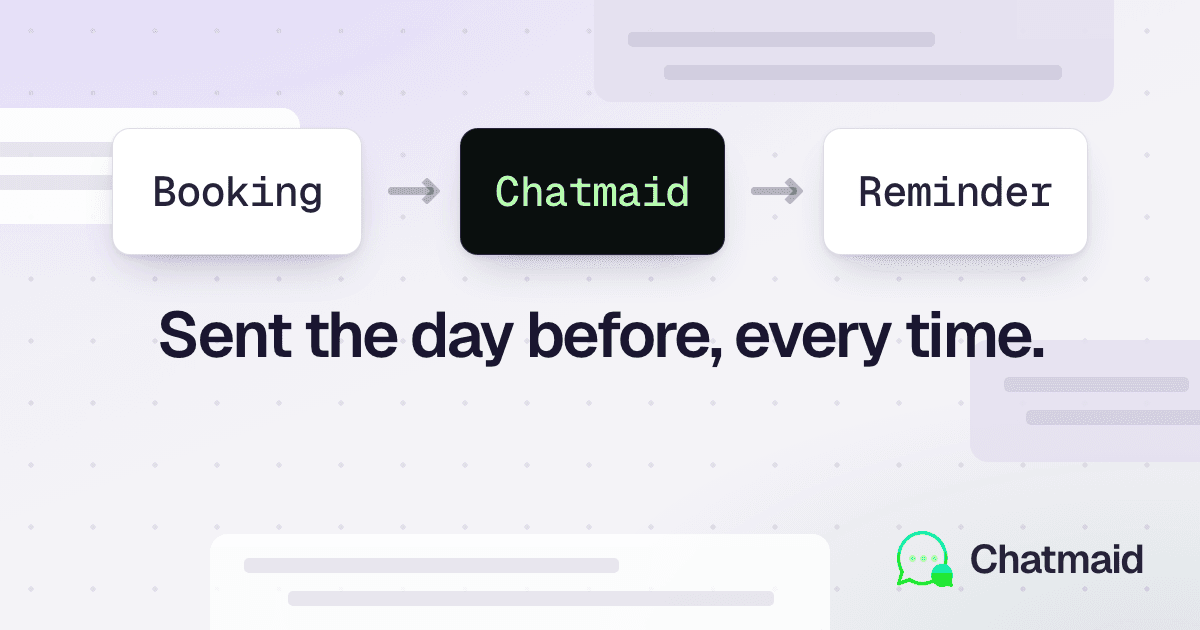
The reminder system has four components:
- Booking ingestion — reads appointment data from your booking system (Calendly, Cal.com, Acuity, or your own database)
- Reminder scheduler — calculates when to send each reminder and queues the jobs
- Message sender — sends WhatsApp messages via Chatmaid at the scheduled time
- Reply handler — processes confirmations, reschedule requests, and cancellations from customers
Reminder Sequence
The optimal sequence for most service businesses:
| Timing | Message type | Purpose |
|---|---|---|
| Immediately after booking | Booking confirmation | Confirm the appointment, set expectations |
| 48 hours before | First reminder | Warm reminder, request confirmation |
| 24 hours before | Confirmation reminder | Ask for explicit CONFIRM or CANCEL |
| 2 hours before | Final reminder | For same-day appointments |
| After appointment | Follow-up | Request review, book next appointment |
You don't need all five for every business. Start with the 24-hour reminder with confirmation request — it has the highest impact on no-shows.
Part 1: Booking Confirmation (Immediate)
Trigger this from your booking system's webhook:
from flask import Flask, request, jsonify
from datetime import datetime
import hashlib

from tasks import send_whatsapp_task, schedule_reminders

app = Flask(__name__)


@app.route("/webhooks/calendly", methods=["POST"])
def calendly_webhook():
    """Handle Calendly booking events."""
    payload = request.json
    event_type = payload.get("event")

    if event_type == "invitee.created":
        booking = payload["payload"]

        send_booking_confirmation(
            phone=booking["text_reminder_number"],
            name=booking["name"],
            event_name=booking["event_type"]["name"],
            start_time=booking["event"]["start_time"],
            location=booking["event"]["location"],
            cancel_url=booking["cancel_url"],
            reschedule_url=booking["reschedule_url"]
        )

    elif event_type == "invitee.canceled":
        # Handle cancellation notification to business
        pass

    return jsonify({}), 200


def send_booking_confirmation(
    phone, name, event_name, start_time,
    location, cancel_url, reschedule_url
):
    """Send immediate booking confirmation."""
    dt = datetime.fromisoformat(start_time.replace('Z', '+00:00'))
    formatted_time = dt.strftime("%A, %B %d at %I:%M %p")

    message = (
        f"Hi {name}! Your appointment is confirmed ✅\n\n"
        f"📅 {event_name}\n"
        f"🕐 {formatted_time}\n"
        f"📍 {location}\n\n"
        f"Need to change it?\n"
        f"• Reschedule: {reschedule_url}\n"
        f"• Cancel: {cancel_url}\n\n"
        f"We'll send you a reminder tomorrow. See you soon!"
    )

    send_whatsapp_task.delay(
        to=phone,
        content=message,
        idempotency_key=f"booking-confirm-{hashlib.md5(phone.encode()).hexdigest()}-{start_time}"
    )

    # Schedule the reminder sequence
    schedule_reminders.delay(
        phone=phone,
        name=name,
        event_name=event_name,
        start_time=start_time,
        location=location,
        cancel_url=cancel_url,
        reschedule_url=reschedule_url
    )
Part 2: Scheduled Reminders with Celery Beat
import os
from datetime import datetime, timedelta

import pytz
import requests
from celery import Celery

celery = Celery("tasks", broker=os.environ["REDIS_URL"])


@celery.task
def schedule_reminders(phone, name, event_name, start_time,
                       location, cancel_url, reschedule_url):
    """Schedule all reminders for an appointment."""

    appointment_dt = datetime.fromisoformat(start_time.replace('Z', '+00:00'))
    now = datetime.now(pytz.UTC)

    reminders = [
        {
            "offset_hours": -48,
            "message_type": "48h_reminder",
            "task": send_48h_reminder
        },
        {
            "offset_hours": -24,
            "message_type": "24h_reminder",
            "task": send_24h_reminder
        },
        {
            "offset_hours": -2,
            "message_type": "2h_reminder",
            "task": send_2h_reminder
        }
    ]

    for reminder in reminders:
        send_time = appointment_dt + timedelta(hours=reminder["offset_hours"])

        if send_time > now:  # Only schedule future reminders
            reminder["task"].apply_async(
                kwargs={
                    "phone": phone,
                    "name": name,
                    "event_name": event_name,
                    "start_time": start_time,
                    "location": location,
                    "cancel_url": cancel_url,
                    "reschedule_url": reschedule_url
                },
                eta=send_time
            )


@celery.task
def send_48h_reminder(phone, name, event_name, start_time,
                      location, cancel_url, reschedule_url):
    """Send 48-hour reminder."""
    dt = datetime.fromisoformat(start_time.replace('Z', '+00:00'))
    formatted = dt.strftime("%A, %B %d at %I:%M %p")

    message = (
        f"Hi {name}! Reminder: you have an appointment in 2 days.\n\n"
        f"📅 {event_name}\n"
        f"🕐 {formatted}\n"
        f"📍 {location}\n\n"
        f"Can't make it? Please let us know:\n"
        f"• Reschedule: {reschedule_url}\n"
        f"• Cancel: {cancel_url}"
    )

    send_whatsapp_direct(phone, message)


@celery.task
def send_24h_reminder(phone, name, event_name, start_time,
                      location, cancel_url, reschedule_url):
    """Send 24-hour reminder with confirmation request."""
    dt = datetime.fromisoformat(start_time.replace('Z', '+00:00'))
    formatted = dt.strftime("%A, %B %d at %I:%M %p")

    message = (
        f"Hi {name}! Your appointment is tomorrow 👋\n\n"
        f"📅 {event_name}\n"
        f"🕐 {formatted}\n"
        f"📍 {location}\n\n"
        f"Please confirm by replying:\n"
        f"✅ *CONFIRM* — I'll be there\n"
        f"📅 *RESCHEDULE* — I need a different time\n"
        f"❌ *CANCEL* — I can't make it"
    )

    # Store that we're waiting for a confirmation
    store_pending_confirmation(phone, start_time)

    send_whatsapp_direct(phone, message)


@celery.task
def send_2h_reminder(phone, name, event_name, start_time, location, **kwargs):
    """Send 2-hour reminder."""
    dt = datetime.fromisoformat(start_time.replace('Z', '+00:00'))
    formatted = dt.strftime("%I:%M %p")

    message = (
        f"See you in 2 hours, {name}! ⏰\n\n"
        f"📅 {event_name} at {formatted}\n"
        f"📍 {location}"
    )

    send_whatsapp_direct(phone, message)


def send_whatsapp_direct(phone: str, content: str):
    """Send WhatsApp without task queue (called from within tasks)."""
    requests.post(
        "https://developers-api.chatmaid.net/v1/messages/send",
        headers={"Authorization": f"Bearer {os.environ['CHATMAID_API_KEY']}"},
        json={
            "fromPhoneId": os.environ["SENDER_PHONE"],
            "to": phone,
            "content": content
        },
        timeout=10
    )
Part 3: Handling Replies (CONFIRM / RESCHEDULE / CANCEL)
import json
import os

import redis
from flask import jsonify, request

from app import app  # the Flask app from Part 1
from tasks import send_whatsapp_direct

redis_client = redis.from_url(os.environ["REDIS_URL"])


def store_pending_confirmation(phone: str, appointment_time: str):
    """Store that we're expecting a confirmation reply from this number."""
    redis_client.setex(
        f"pending_confirm:{phone}",
        86400,  # Expire after 24 hours
        json.dumps({"appointment_time": appointment_time, "status": "pending"})
    )


def get_pending_confirmation(phone: str) -> dict | None:
    data = redis_client.get(f"pending_confirm:{phone}")
    return json.loads(data) if data else None


@app.route("/webhooks/chatmaid", methods=["POST"])
def handle_whatsapp_reply():
    """Process incoming WhatsApp replies."""
    # ... signature verification ...

    payload = request.json
    if payload["event"] != "message.received":
        return jsonify({}), 200

    phone = payload["data"]["from"]
    message = payload["data"]["content"].strip().upper()

    # Check if we're waiting for a confirmation from this number
    pending = get_pending_confirmation(phone)

    if pending:
        handle_confirmation_reply(phone, message, pending)
    else:
        handle_general_message(phone, message)

    return jsonify({"received": True}), 200


def handle_confirmation_reply(phone: str, message: str, pending: dict):
    """Handle CONFIRM, RESCHEDULE, or CANCEL replies."""

    if message in ("CONFIRM", "YES", "SI", "OUI", "1"):
        # Mark as confirmed
        redis_client.setex(
            f"pending_confirm:{phone}",
            86400,
            json.dumps({**pending, "status": "confirmed"})
        )

        send_whatsapp_direct(
            phone,
            "✅ Confirmed! We'll see you at your appointment. "
            "If anything changes, just reply here."
        )

        # Notify business
        notify_business_of_confirmation(phone, pending["appointment_time"])

    elif message in ("RESCHEDULE", "CHANGE", "CAMBIAR", "2"):
        send_whatsapp_direct(
            phone,
            "No problem! Here's the link to pick a new time:\n"
            f"{get_reschedule_url(phone)}\n\n"
            "Your current slot will be freed up once you book a new one."
        )

    elif message in ("CANCEL", "CANCELAR", "NO", "3"):
        send_whatsapp_direct(
            phone,
            "Your appointment has been cancelled. "
            "If you'd like to rebook in the future, you can always reach us at:\n"
            f"{BOOKING_URL}\n\n"
            "Is there anything we could have done better? Your feedback helps us improve."
        )

        # Trigger cancellation in your booking system
        cancel_appointment_in_system(phone, pending["appointment_time"])

        # Notify business immediately so they can fill the slot
        notify_business_of_cancellation(phone, pending["appointment_time"])

    else:
        # Unrecognized reply
        send_whatsapp_direct(
            phone,
            "Please reply with:\n"
            "✅ *CONFIRM* — to confirm your appointment\n"
            "📅 *RESCHEDULE* — to change the time\n"
            "❌ *CANCEL* — to cancel"
        )


def handle_general_message(phone: str, message: str):
    """Handle messages not related to a pending confirmation."""
    # Route to AI agent or human support
    send_whatsapp_direct(
        phone,
        "Thanks for your message! Our team will get back to you shortly."
    )
    notify_team_of_message(phone, message)
Part 4: Post-Appointment Follow-Up
Send a follow-up after the appointment concludes — for reviews and rebooking:
@celery.task
def send_post_appointment_followup(phone, name, event_name, review_url, booking_url):
    """Send follow-up message after the appointment."""
    message = (
        f"Hi {name}! Hope your {event_name} went well 😊\n\n"
        f"Would you mind leaving a quick review? It helps others find us:\n"
        f"⭐ {review_url}\n\n"
        f"Ready to book your next appointment?\n"
        f"📅 {booking_url}"
    )

    send_whatsapp_direct(phone, message)
Schedule this 1-2 hours after the appointment end time.
Part 5: Integration with Popular Booking Tools
Calendly
Register a webhook in your Calendly dashboard for invitee.created and invitee.canceled events pointing to your Flask endpoint.
Cal.com
Cal.com supports webhooks via the API. Register a webhook for BOOKING_CREATED and BOOKING_CANCELLED events.
Acuity Scheduling
Acuity has webhook support under Integrations → Webhooks. Subscribe to appointment.scheduled and appointment.canceled.
Google Calendar
Use the Google Calendar API's push notifications to watch for new events and extract attendee phone numbers.
Your own database
If you manage bookings in your own system, simply call schedule_reminders.delay() whenever an appointment is created and cancel the jobs if the appointment is cancelled.
No-Show Rate Impact
A well-implemented WhatsApp reminder system with confirmation requests typically achieves:
- 30-50% reduction in no-shows (vs. no reminders)
- 60-80% confirmation rate on the 24-hour reminder
- 15-25% of cancellations received in time to fill the slot
For a business with 100 appointments/month at $100 average value and 20% no-show rate, reducing no-shows to 10% saves $1,000/month. The Chatmaid infrastructure costs $7.99.