How to Schedule WhatsApp Birthday Messages (Even at 12 AM)
Send WhatsApp birthday wishes automatically at 12 a.m. or any hour, scheduled months ahead from iPhone or Android. Personalize each one and copy our templates.
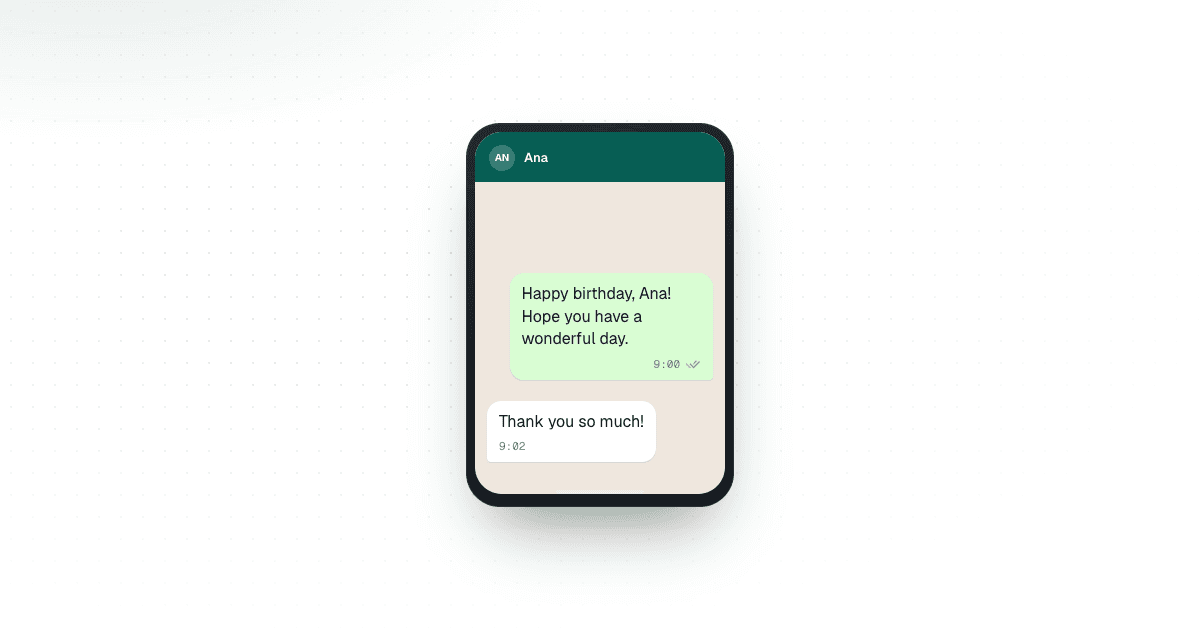
To schedule a WhatsApp birthday message, write the greeting ahead of time, choose the person or group, set it for their birthday at the hour you want it to arrive, whether that is 12 a.m. or 9 a.m., and let a scheduling app send it automatically from your number. With Chatmaid Schedule on iPhone or Android, the message goes out from Chatmaid's cloud at that time, even if your phone is off. Each birthday is a one-time message for that date. Chatmaid repeats messages daily, weekly or monthly, not once a year, so next year you schedule a new greeting.
What about WhatsApp's own scheduler? As of October 2026, WhatsApp is testing scheduled messages with some beta testers only: on Android since October 12 and on iPhone, through TestFlight, since October 22 (Android, iPhone). It is not in the regular app and has no release date. In the beta you can schedule up to two weeks ahead and attach one photo or video per message, and nothing repeats. That covers a birthday next week if you have it. The method below works with the regular WhatsApp app on iPhone and Android today, months ahead, with voice notes and several attachments. More in Can you schedule messages on WhatsApp?
How do you schedule a WhatsApp birthday message?
First time only: install Chatmaid Schedule, create an account with your WhatsApp number, then on the Home tab tap Connect with code. In WhatsApp, open Linked Devices (under Settings on iPhone, or the three-dot menu on Android), tap Link a Device, then Link with phone number instead, and enter the code.
After that, a birthday message takes four steps:
- Pick the recipient. Choose a contact from your phone, a WhatsApp group from the Groups tab, or a number you have not saved from the Unsaved tab.
- Write the greeting. Use their name and one detail only you would know, or start from a saved template. Bold, italic and strikethrough are there if you want them. Tap Attach to add a photo, video or document, or Voice to record a voice note.
- Pick the date and time. Leave it on One-time, choose their birthday, and set the hour you want the message to arrive.
- Confirm. Check that Scheduled Time shows the birthday's date and that it says Phone connected, then tap Confirm Schedule. The message waits under Scheduled in History, and you can edit it any time before it sends.
On the day, Chatmaid sends it from your own WhatsApp number. The app connects to your account as a linked device, the same way WhatsApp Web does, so the greeting lands in your usual chat with that person. It does not go through the WhatsApp Business API, and it does not come from a different number.
About an hour after the send time, open History. Under Completed, Sent means you are done, and Failed shows the reason, so send the wish yourself while it is still their birthday. A message still under Scheduled and marked Retrying is being tried again.
For screen-by-screen walkthroughs, see the guides for iPhone and Android.
How do you send a WhatsApp birthday message at 12 a.m.?
In some families and friend groups, being first at midnight is the whole point. Pick the birthday itself as the date, not the day before, and set the time to 12:00 AM (00:00 on a 24-hour clock; 12:00 PM is noon). On the Confirm Schedule screen, check that Scheduled Time shows the birthday's date at 12:00 AM. Then go to sleep: Chatmaid sends it at midnight even if your phone is off.
That is midnight on your clock. If they live in another time zone, the next section shows how to convert.
What time should a birthday message arrive?
Mid-morning in their time zone, around 9:00 or 10:00 a.m., is a safe default. It arrives early enough to be one of the first wishes, but not so early that it buzzes on the nightstand. Midnight works too when being first is the point.
For someone who lives abroad, convert to their time first: Chatmaid uses your phone's clock, so the time you pick is your local time. For most of the year, midnight in Madrid is 6:00 p.m. the day before in New York, so from New York you pick the day before and 6:00 PM. The same trick lets you wish someone a happy birthday at 9:00 a.m. their time when it is 3:00 a.m. for you. Around clock changes the gap can shift by an hour; the time-zone section of our guide to the best time to send WhatsApp messages has a conversion table.
For clients, stay within business hours. A birthday message from a supplier at 11 p.m. feels odd, however kind it is.
How far ahead can you schedule a birthday message?
With Chatmaid Schedule you can set a birthday weeks or months ahead, so a December birthday can be ready in January, as long as your Chatmaid plan is still active and your WhatsApp is still linked to Chatmaid when it is due. Here is how it compares with WhatsApp's beta for birthdays, as of October 2026:
| What you need | WhatsApp's beta | Chatmaid Schedule |
|---|---|---|
| Works on iPhone | Some TestFlight beta testers only | Yes |
| Works on Android | Some beta testers only | Yes |
| Schedule a birthday two months away | No, two weeks at most | Yes |
| Attachments | One photo or video | Photos, videos, documents and voice notes |
| Sends while your phone is offline | Yes | Yes, even if it is switched off |
| Sends again the following year | No | No, you schedule a new one |
How do you build a birthday list you can trust?
A scheduler is only as good as the list behind it. Before you set anything up, make a simple note or spreadsheet with five columns:
- Name, the way you actually address them ("Grandpa", not his full name).
- WhatsApp number, with the country code.
- Birthday, written with the month as a word ("March 4"), so it cannot be misread.
- How you know them: family, friend, client or coworker. This decides how casual the message can be.
- One thing to mention: a new job, a recent trip, a project you shared.
Writing the month as a word matters. "03/04" is March 4 in the US and April 3 in much of the world, and a swapped day and month is an easy way for a scheduled birthday to go wrong: in that example, the wish arrives almost a month early or late. Sort the list by month, too. It makes the monthly routine below much faster.
Check the list every few months. People change numbers and leave companies, and a warm birthday wish sent to a number that now belongs to a stranger is worse than no wish at all.
How do you personalize birthday messages for a long list?
A birthday wish is a one-to-one message, so schedule one message per person rather than one message to a list of people. Write one solid base message, then change two things for each person: the name and one specific line from the last column of your list.
Base message:
Happy birthday, [Name]! Hope you have a great day.
Personal version:
Happy birthday, Ana! Hope the new apartment is treating you well. Dinner's on me when you're back from Lisbon.
The second version took ten extra seconds to write, and it is the one Ana will remember. A few habits keep it sounding like you:
- Use the name once. Repeating it in every sentence reads as forced.
- Write the way you talk to that person. A cousin and a client should not get the same tone.
- Keep it short. Two or three lines is plenty for a birthday.
- Leave sales out of it. A birthday wish that turns into an offer is worse than silence.
Working in batches by relationship helps. Do all the family birthdays for the month in one go, then friends, then clients. You stay in one tone of voice instead of switching between "Mom" and "Dear Mr. Lee" every minute.
Can you schedule a birthday message to a WhatsApp group?
Yes. In the first step, open the Groups tab and choose the group instead of a contact. It works well for the family group on Grandma's birthday, the team group on a coworker's birthday, or a friends' group where everyone wants to see the wish.
Everyone in the group reads it, so keep anything private for a one-to-one message. A good pattern is both: a short public wish in the group in the morning, and a more personal message straight to them later in the day.
Groups help before the birthday, too. If you are organizing a dinner or a shared gift, schedule a note a week ahead to a group that does not include the birthday person: "Ana's birthday is next Saturday. Who's in for dinner on Friday?"
Can you send a voice note, photo or video for a birthday?
Yes, and this is where a scheduled message can feel more personal than a typed one. At the message step:
- Voice note: tap Voice and record in the app. Thirty seconds of you saying happy birthday, or singing badly, sounds unmistakably like you. It also suits grandparents who prefer listening to reading.
- Photo: an old photo of the two of you, with one line underneath, is a good birthday message on its own.
- Video: collect short clips from family members ahead of time, put them together into one short video, and schedule it so it arrives first thing in the morning.
- Document: a digital gift card or event tickets saved as a file can go out at the same time as the greeting.
Add a line of text with a photo, video or document so the message makes sense in their chat list before they open it. Voice notes cannot carry a caption on WhatsApp, so if a voice note is the only attachment, any text in the same scheduled message does not arrive. Schedule the text as its own message a minute earlier.
How do you handle next year's birthdays?
Chatmaid Schedule's recurring options are daily, weekly and monthly (how recurring messages work). There is no once-a-year option, so a birthday message goes out once, on the date you picked, and next year's greeting is a new message.
To reuse last year's greeting, open History, search their name, open the message under Completed and tap Schedule Again. The recipient, text and attachments are filled in, so you only change the date and the personal line.
The easiest routine is a short monthly session:
- On the last weekend of each month, open your birthday list and look at the month ahead.
- Schedule a message for each birthday in that month. For anyone you wrote to last year, start from Schedule Again.
- Check that the Home tab shows your WhatsApp is connected to Chatmaid.
- Update the list while you are there: new contacts, changed numbers, anyone you no longer need to message.
Doing it on the last weekend means a birthday on the 1st is already scheduled before the month starts. Add one more column to your list for what you sent this year, so next year's message says something new instead of repeating the same words.
If your list is short, mostly close family and friends, one sitting in January works too; for a long list, the monthly routine keeps each sitting short. Messages can be scheduled months ahead, so the whole year can be ready before February. Keep two things in mind for that sitting:
- Messages set months ahead need Chatmaid to stay linked. Leave it under Linked Devices in WhatsApp. WhatsApp logs out linked devices when your phone goes unused for more than 14 days (WhatsApp Help Center), so open WhatsApp on your phone at least every couple of weeks and check that the Home tab shows you are connected.
- If you set the year up during the 7-day free trial, the messages only send if you subscribe before they are due.
Birthday message templates by relationship
Replace everything in square brackets before you schedule. Each template is a starting point, so add one line about the person.
To reuse these, save one base message per relationship in the app: tap More, then Message Templates, then Create Template. In the message step, open Message Templates, pick one, and replace the brackets and the personal line. The app does not fill them in for you.
Family
Happy birthday, Mom! Thank you for every early-morning call and every "did you eat?" I love you. Talk to you tonight.
Happy birthday, [Name]! I still can't believe my little brother is [age]. Hope today is loud, long and full of cake.
Happy birthday, Grandpa! The whole family is thinking of you today. Save me a slice for Sunday.
Friends
Happy birthday, [Name]! You're always the one who remembers everyone else's birthday. Today it's your turn. Drinks this weekend?
Happy birthday! I'm still laughing about [shared memory]. Hope this year is a great one.
Before a voice note (send as its own message a minute earlier):
[Name], happy birthday from [city]! Sorry I can't be there, so a voice note is on its way.
Clients and customers
Happy birthday, [Name]! Wishing you a great day and a good year ahead. Thank you for trusting us with [project or service].
Hi [Name], happy birthday from all of us at [business name]. We hope you get some time off to enjoy it.
Happy birthday, [Name]! You have been with us since [year], and we are grateful for it. Have a wonderful day.
Team and coworkers
Happy birthday, [Name]! The team is lucky to have you. Take it easy today; [task] can wait until tomorrow.
Happy birthday, [Name]! Thanks for everything you put into [project] this year. Enjoy the day.
For the team group:
Today is [Name]'s birthday! Leave your wishes below. Cake in the kitchen at 3.
For reminders, follow-ups and other everyday messages, see 50 WhatsApp reminder message templates.
How do you send birthday wishes to clients without it feeling like marketing?
Treat a client's birthday like a friend's: one person, one message, on their day, with no offer attached. If you want to send a discount, send it on another day.
Only message clients who know you and expect to hear from you. WhatsApp restrictions are very unlikely with normal use. They happen when an account behaves like spam, such as sending unsolicited bulk messages to people who do not have you saved. A birthday wish to a client you work with is ordinary messaging. The same text fired at a long list of strangers is not.
If you manage client birthdays in a browser, Chatmaid Web lets you upload a contact list and personalize each message with the client's name; you still schedule each date. If client birthdays already live in your own database or CRM, Chatmaid Developers gives your system a WhatsApp API that sends each greeting from your own number.
Is Chatmaid Schedule free?
Free for 7 days: the trial includes every feature and needs no credit card. After that, Premium is $2.79 a month. See pricing for all three Chatmaid apps.
Frequently asked questions
Can WhatsApp send birthday wishes automatically every year?
No. WhatsApp's beta cannot repeat messages, and Chatmaid's recurring options are daily, weekly and monthly. Each birthday is a one-time message, so you schedule a new one for next year's date. Schedule Again on last year's message makes that quick.
Can I schedule a birthday message in WhatsApp itself?
Only if you are one of the beta testers WhatsApp is trying scheduled messages with, as of October 2026: some Android beta testers and, since October 22, some iPhone TestFlight testers. There you can schedule up to two weeks ahead. It is not in the regular app, and WhatsApp has not announced it for WhatsApp Web or desktop.
Will the birthday message send if my phone is off?
Yes. Chatmaid sends from its cloud at the scheduled time, even if your phone is off, out of battery or offline. More in how to send WhatsApp messages when your phone is off.
Can I change or cancel a birthday message after scheduling it?
Yes, until it sends. Open History, find it under Scheduled, tap it, and choose Edit Message or Cancel Message.
Can I send a birthday message to someone I have not saved?
Yes. Use the Unsaved tab and enter their number with the country code. See how to message unsaved contacts.
Will the person know the message was scheduled?
No. It arrives from your own WhatsApp number, in your existing chat with them, like any other message you send. Nothing marks it as scheduled.